2.1.10. Jumping across files
We work with an IDE, probably because the project is too huge to handle in small editors. Eclipse can help us quickly open files. This chapter gives an overview on easily navigating from one source file to another.
2.1.10.1. Opening existing file within project
Ctrl + Shift + r (Open Resource) is the handy keyboard shortcut.
()
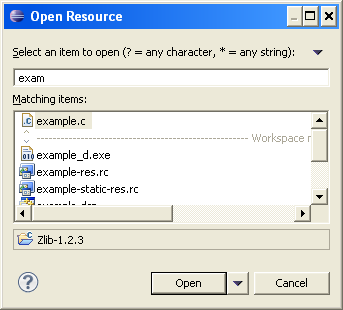
Just like Quick Outline this view also supports wild cards.
2.1.10.2. Go to already open file
We mostly open more than one files. Sometimes we need to jump around to another file. An already open file. If we open many files, moving around becomes little difficult. This is how we move around files in Eclipse.
Ctrl + E — Jump to any Editor.
Warning
Ctrl + TAB has a different use in Eclipse.
Ctrl + PageUp / Ctrl + PageDown can be used to go to next or
previous editor.
2.1.10.3. Go to last edited File
Eclipse can quickly jump to last edited section. Just press Ctrl + Q.
Eclipse would take us there.